Build Your Own Crontab Tool
This challenge is to build a tool to help software engineers understand crontab expressions.
On a surprisingly regular cadence I find myself introducing software engineers to crontab, explaining that there’s no need to build a tool to schedule jobs because the server OS - whatever flavour of Linux (or Unix) we’re using has a tool built in.
It’s called cron and it’s been on Unix and Unix-like operating systems since 1975. Like many of the great Unix tools it has one job - scheduling jobs and it does it well. One area I’ve seen many engineers struggle with however has been configuring it.
The Challenge - Building a crontab Decoder
So in this challenge we’re going to learn about cron, how to configure it and we’re going to build a tool to decode it’s configuration: crontab (short for cron table).
So what does a crontab file look like? If I used it to send out the Coding Challenges newsletter at 9am on Saturdays, it would look something like this:
0 9 * * 6 <command to send Coding Challenges>
Which can be interpreted using the following:
# ┌───────────── minute (0–59)
# │ ┌───────────── hour (0–23)
# │ │ ┌───────────── day of the month (1–31)
# │ │ │ ┌───────────── month (1–12)
# │ │ │ │ ┌───────────── day of the week (0–6) (Sunday to Saturday;
# │ │ │ │ │                                   7 is Sunday on some systems)
# │ │ │ │ │
# │ │ │ │ │
# * * * * * <command>
There are also some extensions such as @yearly, @monthly, @daily and so on. For these fields the allowed values are:
| Field | Required | Allowed values | Allowed special characters | Remarks |
|---|---|---|---|---|
| Minutes | Yes | 0–59 | * , - | |
| Hours | Yes | 0–23 | * , - | |
| Day of month | Yes | 1–31 | * , - ? L W | ? L W only in some implementations |
| Month | Yes | 1–12 or JAN–DEC | * , - | |
| Day of week | Yes | 0–6 or SUN–SAT | * , - ? L # | ? L # only in some implementations |
- is then a wildcard, meaning all.
, separates items in a list, i.e. 1,3,5.
- defines a range, i.e. 1-5.
/ specifies step values, i.e. /5 for every 5 minutes.
L stands for last, as in last day of the week.
W for a weekday in the day of the month field.
Use man on your system to dig into the full documentation.
Step Zero
In this step you decide which programming language and IDE you’re going to use and you get yourself setup with a nice new project.
You can develop your solution to this challenge as a command like tool, GUI or entirely as a frontend, web-based project. The last time I did it, I did it in TypeScript building a frontend in React and Material UI.
Step 1
In this step your goal is to build the user interface for your solution. You will want to accept from the user a cron expression of five fields, for example: 0 9 * * SAT.
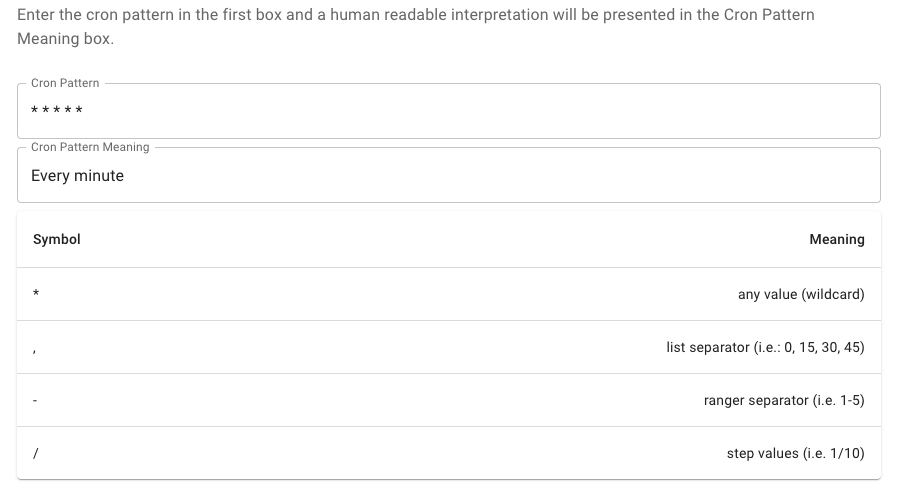
Here’s my UI in React, I decided to add a table explaining (reminding) what each symbol means:
Step 2
In this step your goal is to validate the crontab expression and provide the user with an informative error if it is not valid.
This is a great step to practice TDD on. You can create a range of valid and invalid patterns then test your validation code.
Step 3
In this step your goal is to translate the expression into natural language. Many developers find the patterns somewhat cryptic so having a tool to translate them to natural language is useful.
Again this is a great exercise for TDD. Once your translation functionality is completed, add it to your UI. Here’s a couple of examples from mine.


Once you’ve done that congratulations you’ve completed this Coding Challenge.
Help Others by Sharing Your Solutions!
If you think your solution is an example other developers can learn from please share it, put it on GitHub, GitLab or elsewhere. Then let me know - ping me a message on the Discord Server, via Twitter or LinkedIn or just post about it there and tag me. Alternately please add a link to it in the Coding Challenges Shared Solutions Github repo.
Get The Challenges By Email
If you would like to receive the coding challenges by email, you can subscribe to the weekly newsletter on SubStack here: